




Grayscale printer test page
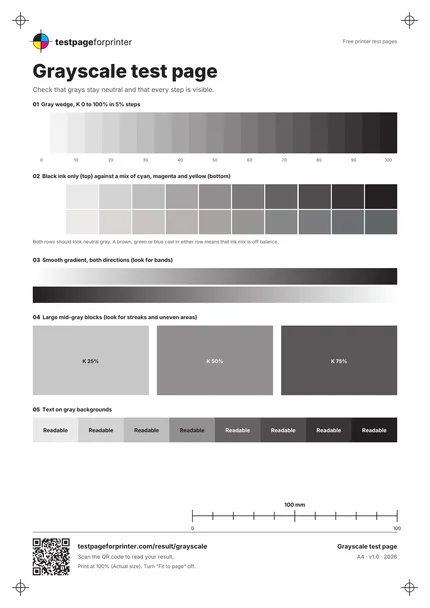
A free grayscale test page that checks whether grays stay neutral, whether every tone step shows, and whether big gray areas print evenly.
Opens the PDF. Use Print or Share from there.
Download PDFPrint one copy first. This PDF does not measure ink or toner use.
Free PDF. No sign-up. Ready to print.
In the print dialog, choose Actual size or 100% and turn off Fit to page.In the print screen, choose Actual size or 100% (not Fit).

What each part checks
A 21-step gray wedge
Black ink from 0 to 100% in 5% steps. You should be able to tell neighboring steps apart, especially in the light and dark ends.
Black ink against a CMY mix
Two rows of gray. The top row uses black only; the bottom row mixes cyan, magenta and yellow with no black. Both should look neutral.
Two smooth gradients
A 120-step gradient printed in both directions. Light stripes or visible bands across it point to head, feed or quality-setting problems.
Large gray blocks
Three big blocks at 25, 50 and 75% black. Large flat areas show streaks and uneven coverage that small samples hide.
Text on gray
Eight tinted strips with the word Readable in black or white. Check that the text stays clear on every background.
Registration marks
Corner marks and the footer text help you confirm the page printed at actual size and in the right place.
How to read your print
- Neutral grays.
- Gray should look gray. A brown, green or blue cast in either row means one ink is out of balance or the driver is mixing color into gray.
- Visible steps.
- Most of the 21 steps should be distinct. If the darkest steps merge, the printer is putting down too much ink or toner.
- Even blocks.
- The three large blocks should look flat. Horizontal lines or blotches suggest a clogged nozzle, a dirty roller or a worn drum.
- Readable text.
- Text on dark strips and on light strips should both stay crisp. Fuzzy edges on the dark strips can mean ink spread.
Keep the guide handy
The QR code on the printed sheet opens this page on your phone.
Print settings that matter
Print settings that matter
- Try Grayscale or Black onlyMany drivers have a Grayscale or Black ink only option. Print once with it on and once with it off, then compare the two CMY-mix rows.
- Print at actual size (100%)Choose Actual size or 100% and turn off Fit to page, so the blocks and the footer text keep their real size.
- Use plain paper firstPlain paper is the everyday baseline. Note the paper type when you compare prints, because coated paper changes how grays look.
Related sheets

Read the full guide
What this grayscale test page is
This is a one-page grayscale printer test. It prints a 21-step gray wedge, two neutral-gray comparison rows, smooth gradients, three large gray blocks and text on gray backgrounds. It works on inkjet, laser and monochrome printers. Our black and white test page covers contrast, text and solid black; this page goes deeper on gray itself.
When to use it
Print it when black-and-white photos look tinted, when grays look warm or cool, when gradients show bands, or when large gray areas look blotchy. It is also a good check after you swap an ink or toner cartridge, or change the grayscale setting in the driver.
What good looks like
The wedge steps get steadily darker with no jumps. Both gray rows look neutral. The gradients fade smoothly. The three large blocks look flat from edge to edge. Text stays readable on every strip.
What bad looks like
A brown or green cast in the bottom row usually means the CMY mix is unbalanced, which matters because many inkjets build gray from colored ink. Horizontal light lines through the big blocks suggest a blocked nozzle; see streaks or lines. Steps that merge or jump point to banding or a quality setting that is too low. If all the grays look faded, read about faded print.
What to do next
Scan the QR code on the sheet, or open Read your result, to match what you see to a likely cause. For a closer look at each ink, use the CMYK test page or the nozzle check. Compare two prints by changing only one thing between them, such as the paper or the quality setting. Do not run repeated cleaning cycles after one bad print: reprint once, check again, then clean.
Good questions
What does a grayscale test page show?
Why is my gray print not neutral?
How is this different from the black and white test page?
Does it work on a laser printer?
How much ink does it use?
Also useful
- Fix faded print
- Fix banding
- Inkjet printer test page
- Laser printer test page
- All PDF downloads
- CMYK vs RGB explained
- Printer test images (PNG)
- Color test page
- Alignment & margins
- Nozzle check
- Blank page test
- Scale check sheet
- Duplex front/back test
- Ink saver test page
- Borderless test page
- Printer ruler test page
- Text clarity test page
- Grid test page
- Resolution test page
- Solid black test page