





Color test page
A free printer color test with swatches, ramps, skin tones and text, so one print shows how your printer handles color.
Ink use ~ 7% of a page
Free PDF. No sign-up. Ready to print.
What each part checks
One sheet. Six useful checks.
- 1
Solid color swatches
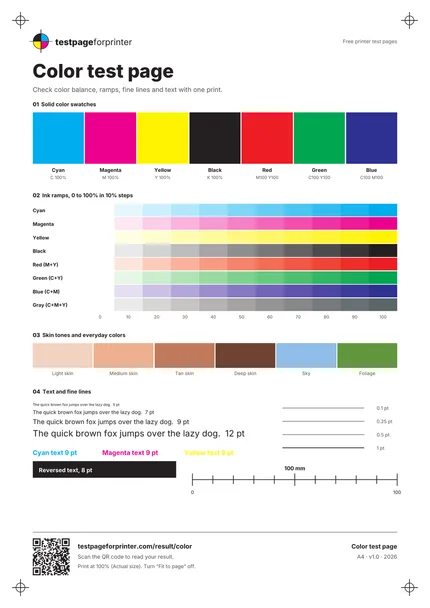
Seven 25 mm swatches: cyan, magenta, yellow, black, red, green and blue. Each should be even, with no streaks or blotches.
- 2
Ink ramps
Eight ramps from 0 to 100% in 10% steps: cyan, magenta, yellow, black, red, green, blue and a neutral gray. Look for steps that merge or jump.
- 3
Skin tones and everyday colors
Four skin tones plus sky and foliage patches. A color cast shows up fastest in these familiar colors.
- 4
Text at four sizes
Text at 5, 7, 9 and 12 pt, plus cyan, magenta and yellow text and a block of reversed text. Check that small type stays readable.
- 5
Fine lines
Lines at 0.1, 0.25, 0.5 and 1 pt. Thin lines that break up or vanish point to resolution or quality settings.
- 6
100 mm scale bar
A bar you can measure with a ruler to confirm the page printed at actual size, not shrunk to fit.
How to read your print
- Even swatches.
- Each solid block should look uniform from edge to edge, without bands or lighter stripes.
- Smooth ramps.
- You should see about eleven distinct steps per ramp, getting steadily darker without a sudden jump.
- Neutral gray.
- The gray ramp should look gray. A pink, green or blue tint means one ink is off balance.
- Missing color.
- If one swatch is pale or missing, or red, green and blue look wrong, that ink may be low or clogged.
Print settings that matter
- 1Print at actual size (100%)Choose Actual size or 100% and turn off Fit to page. Menu names vary by program, but scaling changes line widths and the scale bar.
- 2Use plain paper firstPlain paper is a good everyday baseline. Switch to photo paper and a matching paper type only when you want to test photo output.
- 3Pick one quality settingUse Normal or Standard for a baseline, then repeat on High to compare. Change one setting at a time so you know what caused a difference.
- More printing tips
Related sheets

What this color test page is
This is a one-page printer color test. It prints solid swatches, smooth ramps, skin tones, small text and fine lines in one pass. Because the PDF is built from CMYK values, the colors map directly to the four inks most inkjet printers use. If you want the RGB version, the download buttons above include it as well.
When to use it
Print it when colors look off, after you change ink or toner, after a long period without printing, or when you set up a new printer. It also helps you judge a paper change. It is a quick way to see whether a color problem is the printer or the file you were trying to print.
How to print it
- Download the Letter or A4 PDF that matches your paper. Letter is the usual size in the US and Canada, A4 is common elsewhere. See A4 vs Letter if you are not sure.
- Open the PDF in a PDF viewer, not a browser preview if you can avoid it.
- Set scaling to Actual size or 100%. Check the 100 mm bar with a ruler afterward, or use the scale check tool.
- Print on the paper type you normally use.
Need the steps for your system? See the guides for Windows and Mac.
What good looks like
Solid swatches are even. Each ramp steps smoothly from white to full color. The gray ramp looks neutral. Skin tones look natural rather than pink or green. The smallest text is readable and the thin lines are continuous.
What bad looks like
Horizontal white lines through the swatches usually mean a blocked nozzle. See streaks or lines. A swatch that is pale or absent, or a red, green or blue that looks muddy, points to missing color. If everything has a tint, read about wrong colors. Visible steps in a ramp can be banding.
What to do next
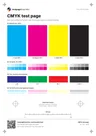
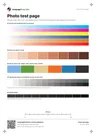
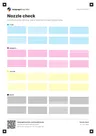
Scan the QR code on the sheet, or open Read your result, to match what you see to a likely cause. If you suspect a clogged inkjet nozzle, run the nozzle check because it shows each ink separately. To see each ink on its own, use the CMYK test page. If photos are what matter to you, the photo test page checks skin tones, gradients and shadow detail more closely.
When you compare two prints, change only one thing between them: the paper, the quality setting or the ink. That way any difference you see has a clear cause.
Color can also differ between your screen and the paper. Screens use light and printers use ink, so an exact match is not realistic. Our guide to CMYK vs RGB explains why. Each sheet page shows an ink estimate for the print, so you can decide whether a repeat print is worth it.
Finally, do not run repeated cleaning cycles after one bad print. Reprint once, check again, and only then clean, because cleaning uses ink. If you are not sure how often to print a test page, see how often to print a test page.