

How does your print look?

Compare your grayscale test page with the options below. Pick the closest one and we will show the likely cause and what to try first.

Choose the closest match to your print

Your printer passed this check.

Share this result

Likely cause: one color ink is low or clogged, or the driver is mixing color ink into gray.

  1. 1.In the print dialog choose Grayscale or Black ink only, then reprint. If the cast goes away, the driver was mixing colors.
  2. 2.Check ink levels, especially cyan, magenta and yellow.
  3. 3.Print the nozzle check to see whether one color is missing lines.
Fix wrong colors

Share this result

Likely cause: too much or too little ink or toner, or a low quality setting.

  1. 1.Reprint at Normal or High quality and compare.
  2. 2.Check that the paper type in the driver matches the paper in the tray.
  3. 3.On a laser printer, check the toner level and the density setting if there is one.
Fix banding

Share this result

Likely cause: a partly clogged nozzle or dirty print head (inkjet), or a dirty roller or worn drum (laser).

  1. 1.Print the nozzle check to see which ink the lines belong to.
  2. 2.On an inkjet, run one cleaning cycle and reprint. If lines remain, run one more and stop.
  3. 3.On a laser printer, check the cartridge and drum instructions.
Fix streaks or lines

Share this result

Likely cause: low ink or toner, an economy or draft mode, or the wrong paper type setting.

  1. 1.Turn off Draft, Economy or Toner Save.
  2. 2.Check ink or toner levels and replace the cartridge if it is low.
  3. 3.Make sure the paper type matches what is in the tray.
Fix faded print

Share this result

Pick the option that matches your print and the likely cause and next steps appear here.

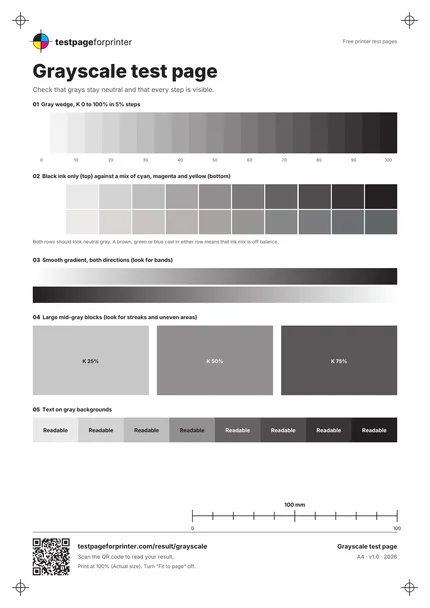
The Grayscale test page
A4 / Letter
  1. 1.Gray wedge from 0 to 100% in 5% steps
  2. 2.Black ink only (top) against a cyan, magenta and yellow mix (bottom)
  3. 3.Smooth gradients in both directions
  4. 4.Large gray blocks at 25, 50 and 75%
  5. 5.Text on gray backgrounds
  • View the page in daylight or bright, neutral light. Warm bulbs add a tint to grays.
  • Print on plain white paper first. Colored or coated paper changes how grays look.
  • Hold the page at arm’s length and then up close, and compare it with a previous print.

Still not right?

Back to the grayscale test page · All test pages