








Black and white test page
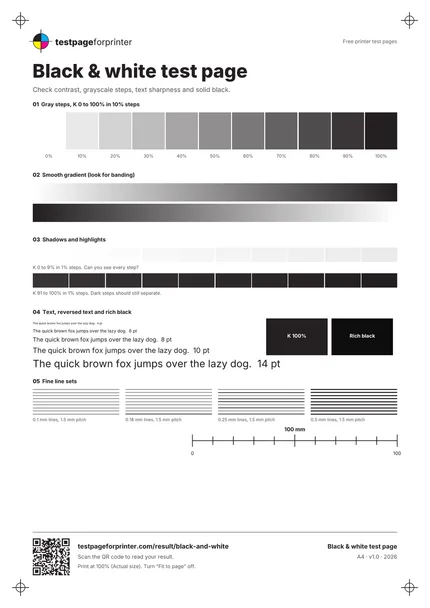
A free black and white test page that checks contrast, grayscale steps, text sharpness and solid black.
What each part checks
One sheet. Six useful checks.
- 1
Eleven gray steps
Black ink from 0 to 100% in 10% steps. Each step should look distinct from its neighbors.
- 2
Smooth gradient
A 120-step gradient printed in both directions. Visible bands or stripes can point to head or quality problems.
- 3
Shadows and highlights
Two rows of 1% steps, from 0 to 9% and from 91 to 100%. This tests whether very light and very dark tones separate.
- 4
Text from 4 to 14 pt
The same sentence at 4, 6, 8, 10 and 14 pt. Small text shows sharpness and ink spread.
- 5
Solid black and rich black
A K 100% block next to a rich black block, both with reversed text. Compare depth and evenness.
- 6
Fine line sets
Line groups at 0.1, 0.18, 0.25 and 0.5 mm, plus a 100 mm scale bar to confirm actual-size printing.
How to read your print
- Distinct steps.
- You should be able to tell most gray steps apart, especially in the middle of the range.
- Smooth gradient.
- The gradient should fade evenly. Light stripes across it suggest a nozzle or feed issue.
- Sharp text.
- Even the 4 pt line should have clean edges. Fuzzy text can mean low quality settings or a low toner level.
- Solid blocks.
- Black blocks should be dark and uniform. Gray streaks or fading edges are worth following up.
Print settings that matter
- 1Print at actual size (100%)Use Actual size or 100% and turn off Fit to page. Menu names vary by program. Scaling changes the line widths and the 100 mm bar.
- 2Try grayscale or black onlyMany drivers offer a Grayscale or Black ink only option. Test with it on and off. Printing grayscale through color inks can add a tint.
- 3Use the paper you normally print onPlain paper is the common case. A coated or photo paper will show a different result, so note the paper when you compare prints.
- More printing tips
Related sheets



What this black and white test page is
This sheet is a black printer test page. It uses only black values, so it works on inkjet, laser and monochrome printers. It prints gray steps, a smooth gradient, text in several sizes, solid black blocks and fine line sets. Together they show contrast, tonal range and sharpness.
When to use it
Use it when text looks faint or fuzzy, when you print mostly documents, after replacing a toner cartridge or black ink, or when a laser printer leaves marks. It is also the right page if you only want to confirm the black channel works without spending color ink. Many people call this a b&w test print, and it serves that purpose well.
How to print it
- Pick the Letter or A4 PDF that matches your paper. The A4 vs Letter guide helps if you are unsure.
- Open it in a PDF viewer and choose Actual size or 100%.
- Print once on plain paper at Normal quality.
- Measure the 100 mm bar. If it is off, use the scale check tool and fix scaling first.
The built-in steps for your system are in the Windows and Mac guides.
What good looks like
Gray steps are distinct. The gradient fades smoothly. Text is crisp down to the smallest size you can reasonably read. The K 100% block is dark and even, and the rich black block looks deeper than plain black on inkjet printers. Fine lines are continuous.
What bad looks like
Horizontal pale lines through blocks or the gradient point to streaks or lines. Overall faint output suggests faded print. Dark marks or ink that rubs off belong to smudges. On a laser, repeating marks in the same spot down the page often mean a drum or roller issue rather than low toner.
A good habit is to keep your first print and label it with the date and settings. When something changes later, you can lay the two sheets side by side and see exactly what moved, instead of trusting memory. Hold both under the same light, because lighting changes how gray steps look.
What to do next
Scan the QR code, or open Read your result, to match your print to a likely cause. If you use an inkjet and see gaps, run the nozzle check. To see whether anything prints where it should not, try the blank page print test. If colors are also a worry, print the color test page.
This sheet shows an ink or toner estimate on its page, so you can judge cost before printing. Fix one thing at a time. Change a single setting, reprint, and compare against your first sheet. If you want a schedule for these checks, see how often to print a test page.