



Tool · Beta
Camera nozzle check
Print the nozzle sheet, take a photo, and get an estimate of broken or faded lines for each ink.
Runs on your device. Your photo is never uploaded.
 Runs on your device. Your photo is never uploaded.
Measure
Take a photo
- Daylight or a bright room, no flash.
- Sheet flat, phone held straight above it.
- All four black corner squares in the photo.
- No glare or shadows across the lines.
 Daylight or a bright room, no flash.
Result
Your result
Estimate, lighting-sensitive, beta
Waiting for a photo.
Add a photo of the printed sheet in step 02.
What the tool saw
How it works
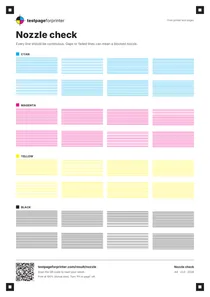
The nozzle sheet has four black squares with a small white square inside, one near each corner. When you add a photo, the tool looks for those four squares. Their positions tell it how the sheet is turned and tilted in the photo, so it can work out where every printed line should be.
Each ink has two rows of line blocks, 96 thin lines per color. The tool follows each line from end to end and compares it with the paper right next to it. Cyan is read from the red channel of the photo, magenta from green, yellow from blue and black from overall brightness. The paper color around each spot is measured too, so a shadow or warm room light does not count as missing ink.
A line with a clear break of about 1 mm or more counts as a gap. A line that is complete but much weaker than the other lines of that ink counts as faded. The result shows the share of lines with gaps for each ink, plus a confidence rating based on sharpness, light, size of the sheet in the photo and how many lines could be measured.
Limits
This is a beta and an estimate. It was tuned on computer-generated photos of the sheet, not on a large set of real phone photos, so treat the numbers as a hint and check the sheet with your own eyes. Glare, deep shadows, blur and a sheet that is small in the photo all make it less reliable. Very short breaks in a line may not be counted. Yellow is the hardest ink to read, because it is light on white paper.
If the tool cannot find all four corner squares, or the lines are too blurry, it says so and does not guess. Low confidence means the photo was readable but not clear: take another one before you decide anything about your printer.
If lines are broken
- 1Run one head cleaning.Use the maintenance menu on the printer or in its app. Then print the nozzle sheet again.
- 2Compare the new sheet.Take a new photo in the same light. Fewer gaps means the cleaning is working.
- 3Stop after a few cleanings.Cleaning uses ink. If gaps stay, the cartridge or print head may need attention.
Brand steps: Epson, Canon, HP, Brother. Learn to read the pattern yourself in the nozzle check guide.