




Tool · Beta
Is your printer printing at the right size?
Print the sheet, measure one bar, get the fix.

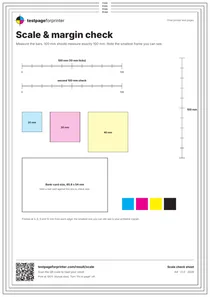
Measure
Measure it
Result
Your result
Scaled to 94%.
Fit to page is probably on. Choose Actual size or Scale 100% in the print dialog, then print again.
Print againBeta: results are a guide based on your measurement.
Why this happens
- 1Fit to page is enabled.Your print dialog shrinks the sheet to fit. Choose Actual size or 100%.
- 2The paper size does not match.Use the same size in the file and printer settings. An A4 sheet on Letter paper prints at about 94%.
- 3Your printer has unprintable edges.Most printers leave a small margin around the page. The nested frames show yours.
Still shrinking? See prints too small, or compare with the alignment test page.
How to use this tool
- Print the sheet on plain paper, Letter or A4, with scale set to 100% (Actual size).
- Measure the 100 mm bar with a ruler and type the length above.
- Pick the smallest margin frame that you can still see on all four sides.
- Read the result and change one print setting at a time.
Everything runs in your browser. Nothing you type is uploaded or stored.
A little more clarity
How do I measure the scale bar?
Use a metal or plastic ruler. Measure the full bar from the first tick mark to the last tick mark, not including the labels. Enter the length in millimeters or inches, and pick which bar you measured.
What if my printer cannot print borderless?
Most printers leave a small unprintable edge, often around 3 to 6 mm (about 0.12 to 0.25 in). The nested frames show your real limit. Seeing the 6 mm frame but not the 3 mm frame is normal.
Should I use Letter or A4?
Use the size of the paper in the tray, and pick the same size in the print dialog and in the sheet. Mixed sizes are the most common reason a sheet is scaled. A4 vs Letter explained.
How accurate does the measurement need to be?
Within about 1 mm over 100 mm is fine for a ruler. A difference of 1% or less is within what many printers and paper feeds produce, so treat it as correct.
My sheet prints at 100% but documents come out small. Why?
The problem is then in the program or its page setup, not in the printer. Check the scale setting inside the app. See prints too small.