






Borderless printer test page
A free borderless test page that shows whether your printer really prints to the edge of the paper, and how many millimeters it cuts off if it does not.
Opens the PDF. Use Print or Share from there.
Download PDFPrint one copy first. This PDF does not measure ink or toner use.
Free PDF. No sign-up. Ready to print.
In the print dialog, choose Actual size or 100% and turn off Fit to page.In the print screen, choose Actual size or 100% (not Fit).

What each part checks
An edge ladder on every side
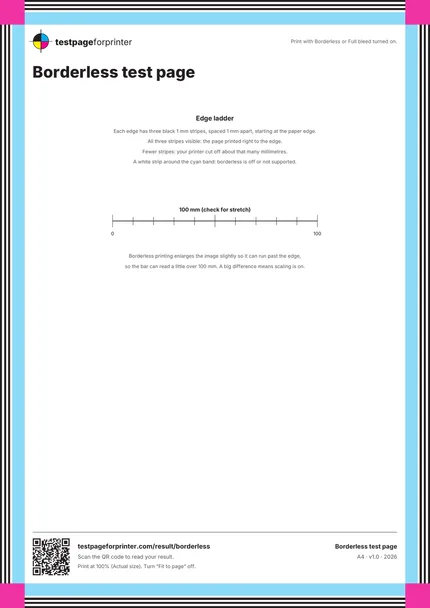
Three black 1 mm stripes, spaced 1 mm apart, start at the paper edge on all four sides. Count how many you can see.
A cyan band
A cyan band sits just inside the ladder. A white strip around it means the printer left a margin.
Corner squares
Magenta squares sit exactly in the four corners. Cut corners show where the printer clips.
A 100 mm scale bar
Borderless printing enlarges the image a little, so this bar can read slightly over 100 mm. A big difference means scaling is on.
Plain instructions
A short guide on the sheet explains how to read the ladder.
No header clutter
The page keeps the center clear so the edge result is easy to see.
How to read your print
- All stripes visible.
- If you can see all three black stripes on every edge, the page printed to the edge.
- Missing stripes.
- Each missing stripe is about 1 to 2 mm cut off. This is common when borderless is off.
- White margin.
- A white strip between the paper edge and the cyan band means borderless is off or the paper size does not support it.
- Uneven edges.
- If the left margin is wider than the right, the paper fed crooked or sits off center in the tray.
Keep the guide handy
The QR code on the printed sheet opens this page on your phone.
Print settings that matter
Print settings that matter
- Turn Borderless or Full bleed onLook in the driver under Layout, Paper or Page setup. The option name varies by brand, and not every printer or paper type supports it.
- Use a supported paper size and typeMany printers only allow borderless on photo paper sizes. If the option is grayed out, try a different paper type.
- Print at actual sizeTurn Fit to page off. The page is already the size of the paper.
Related sheets

Read the full guide
What this borderless test page is
This sheet is designed to touch every edge and every corner of the paper. If your printer prints borderless, the ink runs right to the edge. If not, it leaves a white margin, and the edge ladder tells you how big that margin is.
When to use it
Use it before you print photos or flyers that run to the edge, when a borderless print has white strips at the sides, or when you are not sure whether your printer supports borderless at all. It is also a quick way to see how far the printer can reach on each side.
How to read the ladder
There are three black stripes along each edge, 1 mm wide with 1 mm gaps. Count how many you can see on each side. All three: the printer reached the edge. Two: it lost about 1 mm. One or none: it lost about 3 mm or more. Compare all four edges. If one side is much wider than the others, the paper is feeding skewed.
Why borderless prints a little bigger
To avoid a thin white line at the edge, borderless printing enlarges the image slightly and lets the extra run off the paper. That is normal. It is why the 100 mm bar can measure a little over 100 mm. If it measures a lot more or less, check scale and margins.
If it does not work
Check the paper size and type, then the driver setting. Some printers cannot print borderless at all. Our alignment and margins page shows the margins a printer keeps in normal mode, and misaligned print covers crooked output.
Good questions
What is borderless printing?
Why does my printer leave white edges?
Can every printer print borderless?
Why are my edges not even?
Is it normal for borderless to cut off a little of the image?
Also useful
- Fix misaligned print
- Fix prints too small
- A4 vs Letter
- Inkjet printer test page
- All PDF downloads
- Color test page
- Black & white test page
- CMYK test page
- Nozzle check
- Blank page test
- Duplex front/back test
- Grayscale test page
- Ink saver test page
- Printer ruler test page
- Text clarity test page
- Grid test page
- Resolution test page
- Solid black test page