




Ink saver printer test page
A free test page for draft, economy and toner-save modes, so you can see exactly what a low-ink setting drops before you rely on it.
Opens the PDF. Use Print or Share from there.
Download PDFPrint one copy first. This PDF does not measure ink or toner use.
Free PDF. No sign-up. Ready to print.
In the print dialog, choose Actual size or 100% and turn off Fit to page.In the print screen, choose Actual size or 100% (not Fit).

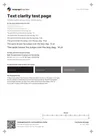
What each part checks
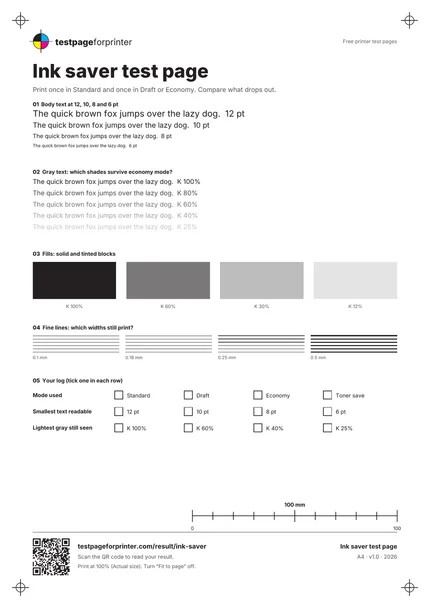
Body text at four sizes
The same sentence at 12, 10, 8 and 6 pt. Small text is the first thing to turn pale or break up in draft mode.
Gray text in five shades
Text at 100, 80, 60, 40 and 25% black. Economy modes often lighten gray text until it disappears.
Solid and tinted blocks
Four blocks at 100, 60, 30 and 12% black. Draft modes thin out fills, so the lightest tint may vanish.
Fine line sets
Lines at 0.1, 0.18, 0.25 and 0.5 mm. Note which widths still print.
A log you can tick
Boxes for the mode you used, the smallest text you could read and the lightest gray you could still see, so two prints are easy to compare.
Mostly white layout
The sheet leaves much of the paper white. Print one copy first; we have not measured ink or toner use.
How to read your print
- Text still readable.
- Note the smallest size you can read comfortably. That is your limit for everyday drafts in this mode.
- Gray lines that vanish.
- If the 40% and 25% lines disappear, light gray text in your documents will disappear too.
- Pale fills.
- Compare the four blocks with the Standard print. A draft print should look lighter, not streaky or banded.
- Streaks.
- Light horizontal lines in draft mode can be normal on some printers, but they should also show up less in Standard. If they do not, see the nozzle check.
Keep the guide handy
The QR code on the printed sheet opens this page on your phone.
Print settings that matter
Print settings that matter
- Print it twicePrint once in Standard or Normal and once in Draft, Economy or Toner Save. Put the two sheets side by side.
- Use the same paper both timesA paper change looks like a mode change. Keep paper, size and scaling identical.
- Print at actual size (100%)Choose Actual size or 100% and turn off Fit to page. Scaling changes line widths and text size.
Related sheets

Read the full guide
What this ink saver test page is
Draft, economy and toner-save modes use less ink or toner by printing lighter and sometimes at lower resolution. This page shows what that costs you. It has text at four sizes, gray text in five shades, solid and tinted blocks and fine lines, plus a short log for what you saw.
When to use it
Use it before you switch a printer to draft mode for everyday documents, when you are trying to cut ink costs, or when a printer prints pale after you changed a setting. It also helps you decide whether a draft print is good enough for a boarding pass, a recipe or a draft report.
How to use it
Print one copy in Standard and one copy in your saver mode. Compare the same four things in both: the smallest readable text, the lightest gray text, the lightest fill and the thinnest line. Tick the boxes in the log on each sheet so you can compare later. Our ink cost calculator turns a cartridge price and its page yield into a cost per page if you want to check how much the saver mode is really saving.
What good looks like
In Standard, everything is readable down to the 6 pt line and the 25% gray. In a saver mode, a pale but even result is normal: lighter text and fills, but no breaks in the lines and no missing blocks.
What bad looks like
Text that breaks up into dots, grays that vanish completely, or light streaks that also appear in Standard are not saver-mode effects. Those point to a problem with the printer. See faded print and streaks or lines, or run the nozzle check.
Good questions
What is ink saver mode?
Does draft mode really save ink?
Why does light gray text disappear in economy mode?
Will draft mode damage my printer?
Should I use this or the black and white page?
Also useful
- Fix faded print
- Ink cost per page
- Solid black test page
- How often to print a test page
- Inkjet printer test page
- Laser printer test page
- All PDF downloads
- Color test page
- CMYK test page
- Alignment & margins
- Nozzle check
- Scale check sheet
- Photo test page
- Duplex front/back test
- Grayscale test page
- Borderless test page
- Printer ruler test page
- Grid test page
- Resolution test page