






CMYK test page
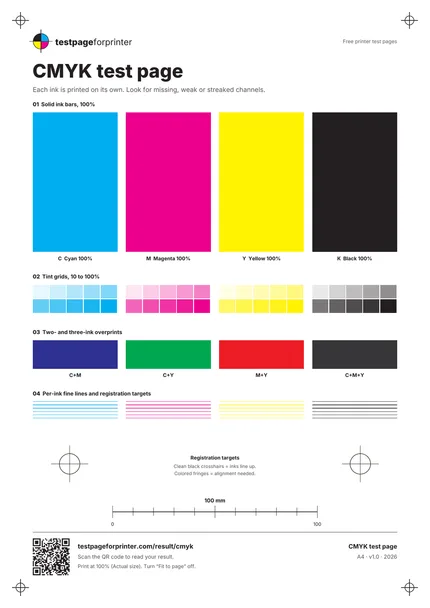
A CMYK test page that prints cyan, magenta, yellow and black on their own, so you can see which ink is weak or missing.
What each part checks
One sheet. Six useful checks.
- 1
Solid ink bars
Four tall bars at 100%: cyan, magenta, yellow and black. Each should be a clean, even block.
- 2
Tint grids
Each ink in ten steps from 10 to 100%. Look for steps that disappear or merge.
- 3
Two-ink overprints
Blocks of C+M, C+Y and M+Y. They should look like blue, green and red, not muddy or off-hue.
- 4
Three-ink overprint
A C+M+Y block. It should look dark and neutral, which shows how the three inks combine.
- 5
Per-ink fine lines
Six thin lines in each ink. Broken or missing lines in one color point to that channel.
- 6
Registration targets
Two targets where all four inks are overlaid. Clean crosshairs mean the inks line up, colored fringes mean they do not.
How to read your print
- Each bar solid.
- A pale or striped bar usually points to the matching ink or its nozzles.
- Overprints look right.
- Wrong secondary colors often mean one of the two inks is weak.
- Tints separate.
- You should see ten steps per ink. Missing light steps suggest the ink is too faint.
- Targets clean.
- Colored edges on the registration crosshairs mean the heads or the inks are slightly out of alignment.
Print settings that matter
- 1Print at actual size (100%)Choose Actual size or 100% and turn off Fit to page. Menu names vary by program.
- 2Keep color management simpleIf your driver or app offers a color management option, let the printer manage colors for this test, so the inks print as sent. Names vary by program.
- 3Use plain paper at standard qualityThis gives a fair baseline. Changing the paper type also changes how much ink is laid down, so change one setting at a time.
- More printing tips
Related sheets

What this CMYK test page is
CMYK stands for cyan, magenta, yellow and key (black). Most inkjet printers and many laser printers build every color from these four. A cmyk test page prints each channel by itself, so a problem in one ink is easy to spot. A full color page can hide it.
CMYK vs RGB, briefly
Screens use RGB: red, green and blue light. Printers use CMYK inks on paper. The PDF on this page uses DeviceCMYK values, which means true CMYK: the color numbers inside the file are cyan, magenta, yellow and black percentages, not RGB values that your driver converts. On-screen previews of the page are only approximations, because a screen has to translate CMYK to RGB to show it. Judge the paper, not the preview. Our CMYK vs RGB guide goes deeper.
When to use it
Use it when one color looks weak, when reds, greens or blues look wrong, after changing a cartridge, or when you want to isolate which ink is at fault. If you only want a quick overall look, the color test page is simpler. Here you want a printer CMYK test that looks at each channel.
How to print it
- Download the Letter or A4 PDF. See A4 vs Letter if you are unsure which fits.
- Open it in a PDF viewer and select Actual size or 100%.
- Print on plain paper at Normal quality.
If you are not sure where those settings are, see the Windows or Mac guide.
What good looks like
All four bars are solid and even. Ten tint steps are visible in each ink. The secondary colors look like clean blue, green and red. The black crosshairs in the registration targets have no colored edges.
What bad looks like
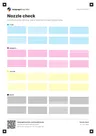
A bar with white lines across it means a blocked nozzle in that ink. Run the nozzle check to confirm. A pale bar can mean low ink, see faded print. A missing channel is covered on missing color. Colored fringes on the registration targets suggest an alignment issue, so see misaligned print.
What to do next
Open Read your result or scan the QR code on the sheet to match your print to a cause. If one ink is clearly weak, check its level, then run one cleaning cycle and reprint. Stop after two cleaning cycles, because cleaning uses ink. For a closer look at nozzle patterns, read how to read a nozzle check. The sheet page shows an ink estimate for this print.
Note that laser printers use toner, not wet ink, so streaks look different. A laser usually shows repeating marks rather than gaps. Use the same page, and read the result with that in mind.