




Printer printing too small?
Almost always a scaling or paper size setting, not a hardware fault.
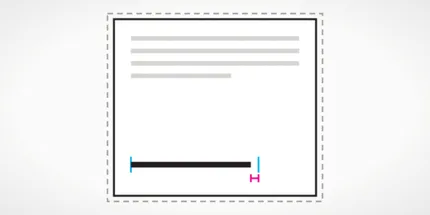

What is happening to the size?
1 of 2Likely cause
Likely cause: Fit to page or Shrink to fit is on, or scale is set below 100 percent.
- 1In the print dialog, set scale to 100 percent or choose Actual size.
- 2Turn off Fit to page, Shrink oversized pages or similar options.
- 3Print the scale check sheet and measure the bar.
Likely cause
Likely cause: paper size mismatch, such as Letter selected while A4 is loaded, or the reverse.
- 1Check the paper size in the print dialog and the printer setting.
- 2Match it to the paper you actually loaded.
- 3Reprint the scale check and measure again.
Likely cause
Likely cause: the PDF viewer or browser is scaling the page to fit printable margins.
- 1In the PDF or browser print dialog, choose Actual size or 100 percent.
- 2Check page size and margins in the browser options.
- 3Print the scale check page from the same app and measure.
Most likely causes
Fit to page or shrink setting
Many apps shrink content to fit within the printable area. This is helpful for some files, but it changes the size of everything on the page.
Scale percent below 100
A saved scale such as 90 percent in a driver or app applies to every job until you change it.
Paper size mismatch (A4 versus Letter)
A4 and Letter are close but not the same. A file made for one and printed for the other can be scaled or have odd margins.
Printable area and margin settings
Printers cannot print to the very edge on every model. Margin settings or borderless options may resize the content.
What to try, in order
- 1Print the scale check sheetPrint it at 100 percent or Actual size. It has a 100 mm bar, squares and a bank-card size box so you can measure with a ruler.
- 2Measure the barUse the scale check tool or a ruler. If the 100 mm bar measures 100 mm, your printer is fine and the issue is in your app or file.
- 3Fix scaling and paper sizeChoose Actual size or 100 percent, turn off Fit to page, and match the paper size to the paper loaded.
- 4Reprint from the same appPrint again from the app that gave you the problem. If the size is right, you are done. If not, check the app’s own page setup.
When to stop and replace
A printer that cannot print the 100 mm bar at 100 mm with Actual size selected is unusual and should be treated as a driver or firmware issue, not worn parts. Try the manufacturer’s current driver from its official site, and if the problem remains, contact the manufacturer. Replacing ink or toner will not change the print size.
Inkjet or laser?
Inkjet printers
Size problems on inkjets are almost never hardware. Check Fit to page, scale and paper size, then measure the scale sheet.
Open the scale checkLaser printers
Lasers behave the same way. Size is a software setting, so check the scale and paper size options before suspecting the printer.
Open the scale checkIf your prints come out smaller than expected, the printer is almost never the cause. The size is decided by software: your app, the browser or PDF viewer and the printer driver. The question is which one is shrinking the page.
Measure instead of guessing
Print the scale check sheet at 100 percent or Actual size. It has a 100 mm horizontal bar with 10 mm ticks, a vertical bar, 20, 30 and 40 mm squares and a box the size of a bank card. On Letter paper it also has a 4 inch bar. Measure the bar with a ruler or the measuring tool on the page. If it is 100 mm, your printer is accurate and the problem is in your file or app. If it is shorter, a scaling setting is active.
The usual suspects
- Fit to page or Shrink to fit: found in most print dialogs. Turn it off or choose Actual size.
- Scale below 100 percent: check the scale box in both the app and the driver.
- Paper size mismatch: choosing Letter for A4 paper, or the reverse, causes scaling or odd margins. Read A4 vs Letter.
- Browser and PDF defaults: these often shrink content to fit margins unless you choose 100 percent.
Where the settings live
The print dialog is different on each platform. Our Windows, Mac, Chromebook, iPhone and iPad and Android guides show how to print a test page and where scaling options hide. Check the same app you had trouble with, since each app can keep its own scale.
If the edges are clipped
If the size is correct but edges are cut off, print the alignment test page. Its nested margin frames at 3, 6, 9 and 12 mm show how much of the page your printer can reach. For doubled or shifted content, see misaligned print. If nothing prints at all, see blank pages.
Good questions
Why does my printer print everything too small?
Does A4 vs Letter cause small prints?
How do I know the printer is printing at the right size?
Why do PDFs print smaller than Word files?
Related problems
- Misaligned printText or colors look doubled or shifted.
- Wrong colorsYour print does not match your screen.
- Blank pagesPaper comes out with nothing on it.
