



How does your print look?

Measure the bars with a ruler, then pick the option that matches. This tells you if your print was scaled.

Choose the closest match to your print

Your printer passed this check. The print is at 100%.

Share this result

Likely cause: the page was scaled below 100%, often by Fit to page or Shrink to fit in the print dialog.

  1. 1.Open the print dialog and set scaling to 100% or Actual size.
  2. 2.Turn off Fit to page, Shrink to fit and any similar option.
  3. 3.Reprint and measure again. Use the scale tool to work out the exact percentage if needed.
Open the scale checker

Share this result

Can mean: scaling is set above 100%, or the app is set to fill the page or a different paper size.

  1. 1.Set scaling to 100% or Actual size and check the paper size matches the paper loaded (A4 or Letter).
  2. 2.Turn off Fill page or Scale to fit options if available.
  3. 3.Reprint and measure again.
Open the scale checker

Share this result

This is normal. Most printers cannot print to the paper edge, and the smallest complete frame shows your unprintable margin.

  1. 1.Note the smallest frame that prints completely on all four sides.
  2. 2.Keep important content inside that margin.
Open the scale checker

Share this result

Your printer prints close to the edge, with a margin of about 3 mm or less. This is common on printers with borderless options.

  1. 1.Keep text a little inside the edge anyway, since feed accuracy varies.

Share this result

Can mean: your printer has a larger unprintable margin, which is normal on many models. A 12 mm margin is a little wide but not unusual.

  1. 1.Use that frame as your safe margin when you lay out documents.
  2. 2.If the margin is wider than you expect, check whether a margin or scale setting in the app or driver is adding space.
Open the scale checker

Share this result

Pick the option that matches your print and the likely cause and next steps appear here.

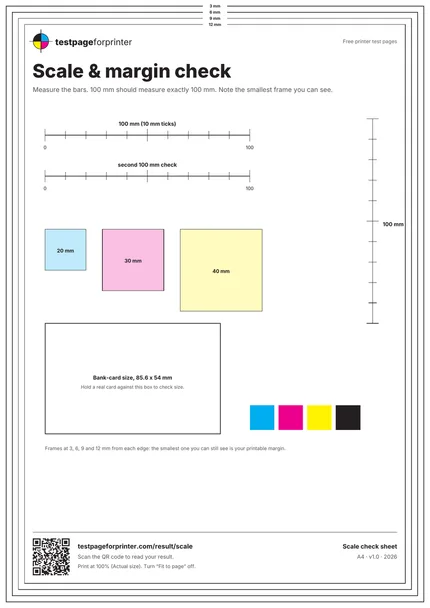
The Scale check sheet
A4 / Letter
  1. 1.Horizontal 100 mm bar with 10 mm ticks
  2. 2.Second 100 mm bar (A4) or 4 in bar (Letter)
  3. 3.Vertical 100 mm bar
  4. 4.20, 30 and 40 mm squares
  5. 5.Bank-card size box, 85.6 x 54 mm
  6. 6.Nested frames at 3, 6, 9 and 12 mm
  • Measure from the 0 tick to the 100 tick with a metal or plastic ruler, not from the paper edge.
  • Check both the horizontal and vertical bars. If only one is wrong, the scaling is uneven.
  • Use the 4 in bar on Letter paper, or the second 100 mm bar on A4, to confirm the first reading.

Still not right?

Back to the scale check sheet · All test pages