


How does your print look?

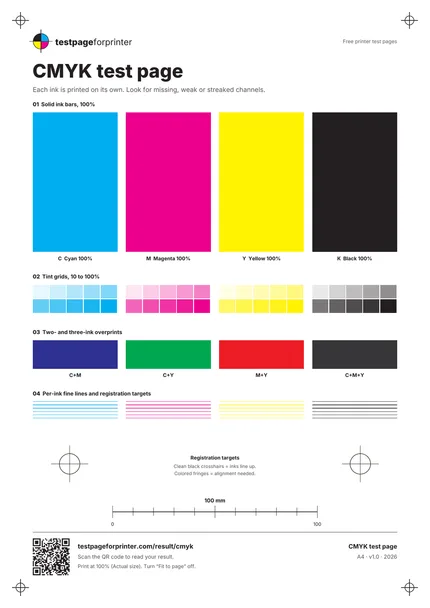
Each ink prints separately on this sheet. Pick the option that matches what you see.
Choose the closest match to your print

Your printer passed this check.

Share this result

Likely cause: that ink or toner is empty, or the print head is blocked for that color.

  1. 1.Check the level of that color and replace the cartridge if it is low or expired.
  2. 2.Print the nozzle check sheet to confirm which color is affected.
  3. 3.On an inkjet, run one cleaning cycle and reprint. Try one more if needed, then stop.
Fix missing color

Share this result

Likely cause: partly blocked nozzles in that color (inkjet), or a toner or drum fault (laser).

  1. 1.Use the nozzle check sheet to see which color the gaps are in.
  2. 2.Run one head cleaning cycle and reprint this page.
  3. 3.If gaps remain after a second cleaning, stop and try the longer steps on the streaks page.
Fix streaks or lines

Share this result

Likely cause: the inks are not lined up with each other, so the print head or colors need alignment. On a laser printer this can mean color registration needs calibration.

  1. 1.Run the printer’s alignment or calibration routine once.
  2. 2.Reprint this page and look at the targets again.
  3. 3.Check that the paper is loaded flat and the guides touch the stack.
Fix misaligned print

Share this result

Can mean: a low quality setting, a head that needs alignment, or a paper feed variation.

  1. 1.Reprint at higher quality with the correct paper type selected.
  2. 2.Run head alignment once if your printer has it.
Fix banding

Share this result

Can mean: one ink is under-delivering, so the mix leans toward the other. Paper type and color settings can also shift the mix.

  1. 1.Compare the single-ink bars first. If one is weaker, treat it as a missing or weak ink.
  2. 2.Check the paper type setting and turn off any color enhancement options.
Fix wrong colors

Share this result

Pick the option that matches your print and the likely cause and next steps appear here.

The CMYK test page
A4 / Letter
  1. 1.Solid ink bars at 100% (cyan, magenta, yellow, black)
  2. 2.Tint grids from 10% to 100%
  3. 3.Two- and three-ink overprints
  4. 4.Per-ink fine lines and registration targets
  • Look at the registration targets with a magnifier or your phone camera zoomed in. Small fringes are easy to miss.
  • Compare the four bars to each other, not to a screen.
  • Use plain white paper so the paper color does not tint the results.

Still not right?

Back to the cmyk test page · All test pages