
How does your print look?

Compare your grid test page with the options below. Pick the closest match and we will show the likely cause and what to try first.

Choose the closest match to your print

Your printer passed this check.

Share this result

Likely cause: uneven paper feed, curled or damp paper, or a dirty feed roller.

  1. 1.Use fresh, flat paper from a sealed pack.
  2. 2.Do not overfill the tray and keep the guides snug.
  3. 3.Wipe the feed rollers as the maker advises.
Fix misaligned print

Share this result

Likely cause: the paper fed at an angle.

  1. 1.Reload the paper with the guides snug against both sides.
  2. 2.Check for a paper scrap or label stuck in the path.
  3. 3.Reprint and compare.
Printer ruler page

Share this result

Likely cause: scaling in one direction, or a wrong paper size setting.

  1. 1.Set scaling to Actual size or 100%.
  2. 2.Check the paper size in the driver and in the tray.
  3. 3.Measure the 100 mm bar with a ruler.
Fix prints too small

Share this result

Likely cause: banding from the print head or the paper feed step.

  1. 1.Print the nozzle check to look for missing lines.
  2. 2.Reprint at a higher quality setting.
  3. 3.Run a head alignment from the maintenance menu.
Fix banding

Share this result

Pick the option that matches your print and the likely cause and next steps appear here.

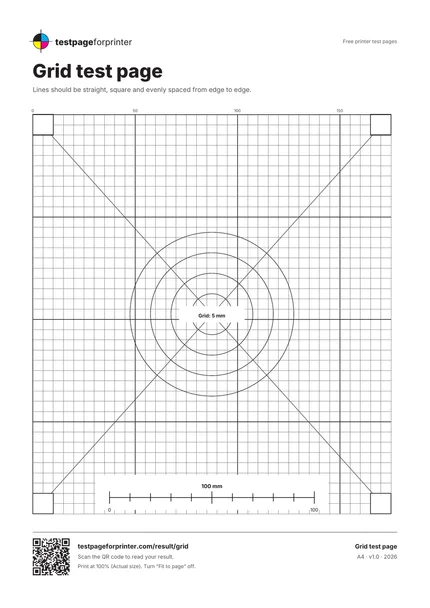
The Grid test page
A4 / Letter
  1. 1.5 mm grid with stronger lines every 10 and 50 mm
  2. 2.Two diagonals
  3. 3.Four concentric circles
  4. 4.Four 10 mm corner squares and a 100 mm bar
  • Hold the page against a window and look along the lines at a shallow angle to spot bends.
  • Use a ruler to check that the 100 mm bar is 100 mm.
  • Use plain flat paper from a sealed pack for a fair test.

Still not right?

Back to the grid test page · All test pages