

How does your print look?

This sheet checks smooth tones, skin colors and shadow detail. Choose the option closest to your print.

Choose the closest match to your print

Your printer passed this check.

Share this result

Likely cause: a low quality setting, a head that needs alignment, or a paper type setting that does not match the paper.

  1. 1.Set high quality and choose the paper type that matches your photo paper.
  2. 2.Run head alignment once if your printer offers it.
  3. 3.Reprint on photo paper and compare.
Fix banding

Share this result

Can mean: one color channel is weak, or color management is not set correctly for this paper. A mismatch between the two grays is partly normal on some printers.

  1. 1.Print the nozzle check sheet to rule out a blocked color.
  2. 2.Let either the printer or the app manage color, not both, and match the paper type.
  3. 3.Compare against the CMYK sheet to see whether a single ink is weak.
Fix wrong colors

Share this result

Can mean: one ink is under-delivering, or the paper type and color settings do not match. Skin tones are sensitive to small shifts.

  1. 1.Check ink levels and run a nozzle check.
  2. 2.Choose the matching paper type and quality, and avoid vivid or enhance options for this test.
Fix wrong colors

Share this result

Can mean: too much ink on the paper, a paper type setting that does not match, or a paper that cannot hold fine dark detail.

  1. 1.Match the paper type setting to the paper you loaded.
  2. 2.Try a different paper made for photos and compare.
Fix faded prints

Share this result

Likely cause: a partly clogged nozzle or dirty head (inkjet), or a drum or roller problem (laser).

  1. 1.Print the nozzle check sheet to see which color is affected.
  2. 2.On an inkjet, run one cleaning cycle and reprint. Try one more if needed, then stop.
Fix streaks or lines

Share this result

Likely cause: that ink is low or blocked.

  1. 1.Check ink levels and reseat the cartridge.
  2. 2.Print the nozzle check sheet, then run one cleaning cycle if that color has gaps.
Fix missing color

Share this result

Pick the option that matches your print and the likely cause and next steps appear here.

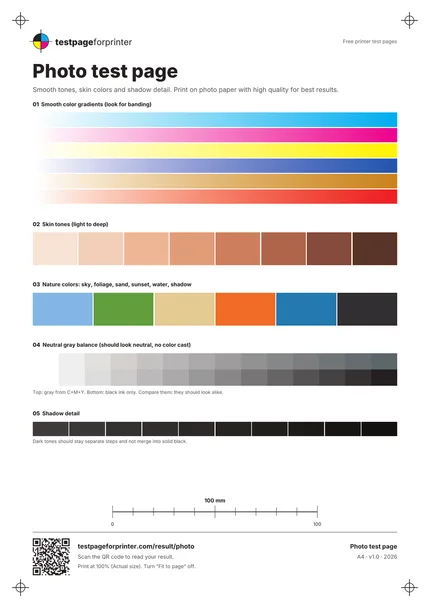
The Photo test page
A4 / Letter
  1. 1.Smooth color gradients (look for banding)
  2. 2.Skin tones from light to deep
  3. 3.Nature colors: sky, foliage, sand, sunset, water, shadow
  4. 4.Neutral gray balance: C+M+Y gray against black ink only
  5. 5.Shadow detail steps
  • View the page in daylight or neutral light, since warm indoor bulbs change how skin tones look.
  • Print on the paper you actually plan to use. Plain paper cannot show photo quality.
  • Let the print dry for several minutes before judging colors, since some inks change as they dry.

Still not right?

Back to the photo test page · All test pages