


How does your print look?

Check the grid, target and margin frames, then pick the option that matches your print.
Choose the closest match to your print

Your printer passed this check.

Share this result

Likely cause: paper is loaded crooked or the paper guides are loose, so the sheet feeds at an angle.

  1. 1.Remove the paper, square the stack, and reload it flat.
  2. 2.Slide the paper guides snug against the stack, without bending it.
  3. 3.Reprint and check again.
Fix misaligned print

Share this result

Likely cause: the print head or colors need alignment (inkjet), or color registration needs calibration (laser).

  1. 1.Run the printer’s head alignment or calibration routine once.
  2. 2.Reprint this sheet and check the target.
Fix misaligned print

Share this result

This is normal. Most printers cannot print right to the edge, and the missing frames show your printer’s unprintable margin.

  1. 1.Note the smallest frame that prints fully. That is your safe margin.
  2. 2.Keep documents inside that margin, or use a borderless option for photos if your printer supports it.
Check your scale and margins

Share this result

Likely cause: the page was scaled, often by Fit to page or Shrink to fit.

  1. 1.Set scaling to 100% or Actual size and turn off Fit to page.
  2. 2.Reprint and measure again.
Check your scale

Share this result

Can mean: head misalignment, low print quality, or a paper feed problem.

  1. 1.Print at high quality and run head alignment once.
  2. 2.Use fresh, flat paper and check that nothing is rubbing the sheet in the paper path.
Fix banding

Share this result

Pick the option that matches your print and the likely cause and next steps appear here.

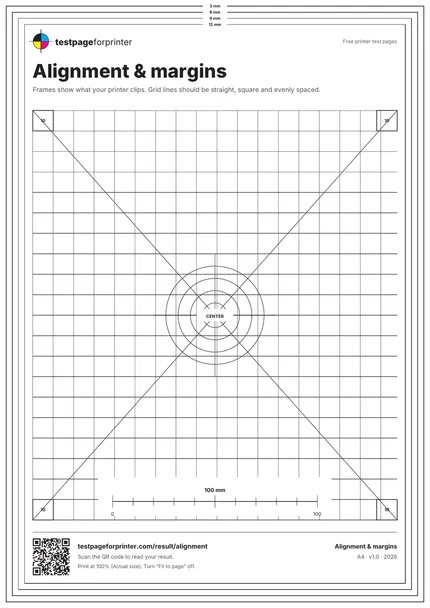
The Alignment & margins
A4 / Letter
  1. 1.10 mm grid and diagonals
  2. 2.Center target with concentric circles and a four-ink crosshair
  3. 3.Four 10 x 10 mm corner squares
  4. 4.Nested margin frames at 3, 6, 9 and 12 mm
  • Hold a ruler or straightedge against a grid line to check that it is straight.
  • Check the frames in good light, since the thin 3 mm frame is easy to overlook.
  • A missing outer frame is not a fault by itself. Printers differ in how close to the edge they print.

Still not right?

Back to the alignment & margins · All test pages