
How does your print look?

Compare your text clarity test page with the options below. Pick the closest match and we will show the likely cause and what to try first.

Choose the closest match to your print

Your printer passed this check.

Share this result

Likely cause: a low quality setting, paper that absorbs ink, or low toner on a laser printer.

  1. 1.Reprint at High or Best quality.
  2. 2.Try a different paper, ideally one made for your printer type.
  3. 3.On a laser printer, check the toner level and shake the cartridge gently as the maker advises.
Fix smudges

Share this result

Likely cause: low ink or toner, or an economy mode is on.

  1. 1.Turn off Draft, Economy or Toner Save.
  2. 2.Check the black ink or toner level.
  3. 3.Run the nozzle check if you have an inkjet.
Fix faded print

Share this result

Likely cause: a clogged black nozzle or a dirty print head.

  1. 1.Print the nozzle check and look at the black row.
  2. 2.Run one cleaning cycle and reprint this page.
  3. 3.If the gaps remain after a second cycle, stop and see the fix page.
Fix streaks or lines

Share this result

Likely cause: print head misalignment, or the paper moved during printing.

  1. 1.Run the printer’s head alignment routine from the maintenance menu.
  2. 2.Reload the paper and straighten the guides.
  3. 3.Reprint and compare.
Fix misaligned print

Share this result

Pick the option that matches your print and the likely cause and next steps appear here.

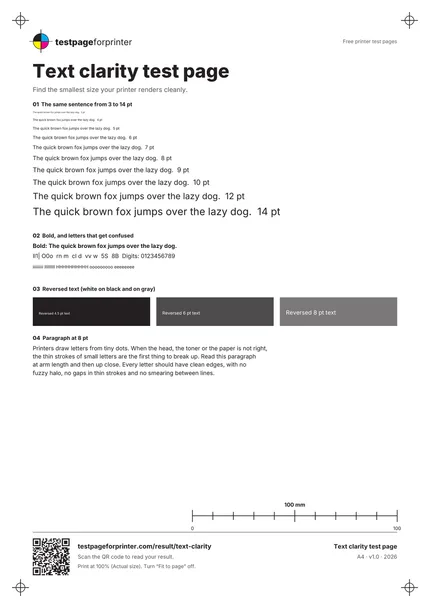
The Text clarity test page
A4 / Letter
  1. 1.The same sentence from 3 to 14 pt
  2. 2.Bold text and look-alike characters
  3. 3.Reversed text on black and gray
  4. 4.A paragraph at 8 pt
  • Read the page at a normal reading distance first, then up close.
  • Use good light and a magnifier if you have one for the smallest lines.
  • Print on the paper you normally use, since paper changes sharpness.

Still not right?

Back to the text clarity test page · All test pages