
How does your print look?

Compare your resolution test page with the options below. Pick the closest match and we will show the likely cause and what to try first.

Choose the closest match to your print

Your printer passed this check.

Share this result

Likely cause: a low quality setting, a paper type setting that does not match the paper, or paper that lets ink spread.

  1. 1.Reprint at High or Best quality.
  2. 2.Match the paper type setting to the paper in the tray.
  3. 3.Try a smoother paper and compare.
Fix smudges

Share this result

Likely cause: print head alignment on an inkjet, or uneven paper feed.

  1. 1.Run the printer’s head alignment routine from its maintenance menu.
  2. 2.Reload flat paper and set the paper guides.
  3. 3.Reprint and compare both directions.
Align a print head

Share this result

Likely cause: blocked nozzles on an inkjet, or a drum or corona wire problem on a laser.

  1. 1.On an inkjet, print the nozzle check and look for gaps.
  2. 2.On a laser, follow the maker’s cleaning steps for streaks.
  3. 3.Reprint this page and compare.
Fix streaks or lines

Share this result

Likely cause: partly blocked nozzles or low ink for that color.

  1. 1.Check the ink level for that color.
  2. 2.Print the nozzle check and look at that color’s band.
  3. 3.Run one cleaning cycle if the band has gaps, then reprint.
Fix a missing color

Share this result

Pick the option that matches your print and the likely cause and next steps appear here.

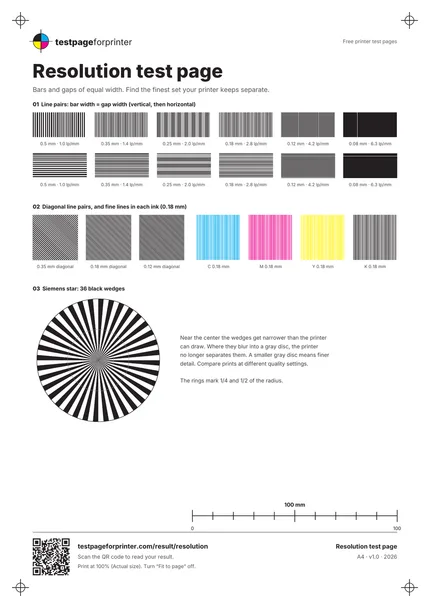
The Resolution test page
A4 / Letter
  1. 1.Line pairs from 0.5 to 0.08 mm, vertical and horizontal
  2. 2.Diagonal line pairs and fine lines in each ink
  3. 3.Siemens star with 36 wedges
  4. 4.100 mm scale bar
  • Look at the page in good light, with a magnifier for the finest sets.
  • Compare prints on the same paper, since paper changes how far ink spreads.
  • Check the 100 mm bar first. If the page was scaled, the line widths are not true.

Still not right?

Back to the resolution test page · All test pages