


How does your print look?

Look closely at every line block, color by color. Gaps and faded lines are what we are looking for.

Choose the closest match to your print

Your printer passed this check.

Share this result

Likely cause: some nozzles in that color are partially clogged with dried ink.

  1. 1.Run one head cleaning cycle from the printer menu or driver.
  2. 2.Reprint this sheet and compare the affected color.
  3. 3.If gaps remain, run one more cleaning cycle and stop. Cleaning uses ink.
  4. 4.If it is still not clear, leave the printer on for several hours and try the printer maker’s deeper cleaning guidance.
Fix streaks or lines

Share this result

Likely cause: that cartridge is empty, not seated correctly, or its nozzles are fully blocked.

  1. 1.Check the ink level and reseat the cartridge.
  2. 2.Run one cleaning cycle and reprint.
  3. 3.If the band is still blank after a second cleaning, replace that cartridge.
Fix missing color

Share this result

Can mean: ink is running low, or the nozzles are partly blocked and delivering less ink.

  1. 1.Check ink levels.
  2. 2.Run one cleaning cycle and reprint.
  3. 3.Compare with the other bands. Yellow is naturally lighter than the others.
Fix faded prints

Share this result

Likely cause: the print head needs alignment. A dirty head can also show this.

  1. 1.Run the printer’s head alignment once.
  2. 2.Reprint and check again. If gaps appear, treat it as a nozzle clog.
Fix misaligned print

Share this result

Can mean: the wrong paper type setting, damp paper, or excess ink after cleaning.

  1. 1.Let the sheet dry and handle it by the edges.
  2. 2.Choose the paper type that matches the paper loaded and reprint.
Fix smudges

Share this result

Can mean: a toner or drum problem, not a clogged nozzle. Head cleaning does not apply to laser printers.

  1. 1.Check the toner cartridge and drum for low toner, damage or debris.
  2. 2.Reseat the cartridge, and check the printer’s manual for cleaning instructions.
Fix streaks or lines

Share this result

Pick the option that matches your print and the likely cause and next steps appear here.

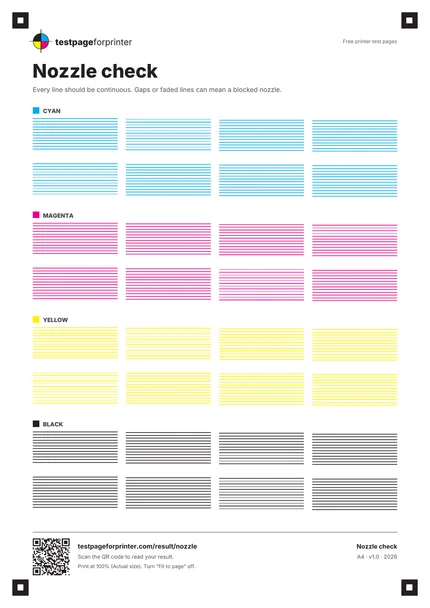
The Nozzle check
A4 / Letter
  1. 1.Cyan band: two rows of four staggered line blocks
  2. 2.Magenta band
  3. 3.Yellow band
  4. 4.Black band
  5. 5.Corner marker squares (used by the optional camera tool)
  • Use a magnifier or your phone camera zoomed in. Tiny gaps are easy to miss.
  • Hold the page in bright light and tilt it, then compare each band with its neighbors.
  • Run no more than two cleaning cycles in a row. If it is not fixed, wait a few hours before trying again.

Still not right?

Back to the nozzle check · All test pages